Get started
Loading documentation… Datool DocsDatool Docs
Connect a small app, catch a failing case, fix it, and compare two saved runs without a model API key.
This tutorial evaluates an uppercase function with two cases. The first run deliberately misses a whitespace requirement. You will fix the function and compare the same cases and scorer across both runs. No model or sandbox provider is required.
Use Node.js 22.18 or newer and a Datool project. In an empty directory, install the CLI:
npm init -y
npm install --save-dev @datool/cli@0.4.0
npx datool auth login --datool https://your-datool-host
npx datool doctor
Replace the host with your instance's origin. Select the same project in the browser and CLI. For API-key authentication, set DATOOL_BASE_URL, DATOOL_PROJECT_ID, and DATOOL_API_KEY instead. This workflow needs apps:read, apps:write, traces:read, datasets:read, datasets:write, scorers:read, scorers:write, evals:read, and evals:write. See compatibility if your server rejects a command.
Save this as datool.config.ts:
import { defineApps } from "@datool/cli"

export default defineApps({
  apps: [{
    id: "docs-uppercase",
    name: "Docs uppercase",
    type: "workflow",
    inputSchema: {
      type: "object",
      properties: { text: { type: "string" } },
      required: ["text"],
      additionalProperties: false,
    },
    outputSchema: {
      type: "object",
      properties: { text: { type: "string" } },
      required: ["text"],
      additionalProperties: false,
    },
    handler: async (input: { text: string }) => ({
      text: input.text.toUpperCase(),
    }),
  }],
})
Start the connection and leave this terminal running:
npx datool connectOpen Playground, select Docs uppercase, and run {"text":"hello"}. Expect {"text":"HELLO"}. Open its trace to inspect the input, output, duration, and status. Connected execution records this outer invocation automatically. Add instrumentation to see internal model and tool calls.
Save cases.json in the same directory:
{
  "format": 1,
  "kind": "dataset",
  "key": "docs-uppercase-cases",
  "description": "Uppercase text and remove surrounding whitespace.",
  "items": [
    {
      "key": "greeting",
      "input": { "text": "hello" },
      "expectedOutput": { "text": "HELLO" },
      "metadata": { "category": "basic" }
    },
    {
      "key": "surrounding-whitespace",
      "input": { "text": " hello " },
      "expectedOutput": { "text": "HELLO" },
      "metadata": { "category": "whitespace" }
    }
  ]
}
In a second terminal, preview and apply the import:
npx datool datasets push cases.json --dry-run
npx datool datasets push cases.json
Open Datasets → docs-uppercase-cases and verify both inputs and expected outputs. Expectations express the requirement; they are not copied from the app's observed output. Keep the import's local sidecar file for later conflict detection.
Create the reusable library scorer from the second terminal:
npx datool scorers use-library --input '{"evaluator":"ExactMatch"}'Open Scorers → AutoEvals: Exact match. Set Pass threshold to 1 and save. Leave the default output and expected-output mappings unchanged: they compare the complete JSON objects. The threshold is required for this tutorial's pass-rate gate; a numeric score alone does not establish a pass decision.
Return to Datasets → docs-uppercase-cases, choose Run dataset, select Docs uppercase and both cases, then select the saved AutoEvals: Exact match scorer under This project.
Start the run and open its detail page. Expected results:
| Case | Actual output | Expected output | Score |
|---|---|---|---|
| greeting | {"text":"HELLO"} | {"text":"HELLO"} | 1, pass |
| surrounding-whitespace | {"text":" HELLO "} | {"text":"HELLO"} | 0, fail |
The application completed both calls successfully, but only one output met the requirement. The mean score and pass rate are both 0.5. An execution error or missing result is a different outcome from a score of zero; investigate it before interpreting quality.
Save the run URL as your baseline. Each case retains the input, output, reference answer, and scorer version used for that judgment.
Change the handler's expression to:
text: input.text.trim().toUpperCase(),Stop the connection with Ctrl-C and restart npx datool connect so it loads the changed handler. On the baseline run, choose Run app again and retain the recorded versions. This uses the baseline's frozen cases and reference answers. It calls your currently connected application; it does not restore old application code.
Both cases should now score 1. Compare the two runs and open the whitespace case: the surrounding spaces should be the only output difference. Keep the same scorer version so the comparison measures the app change.
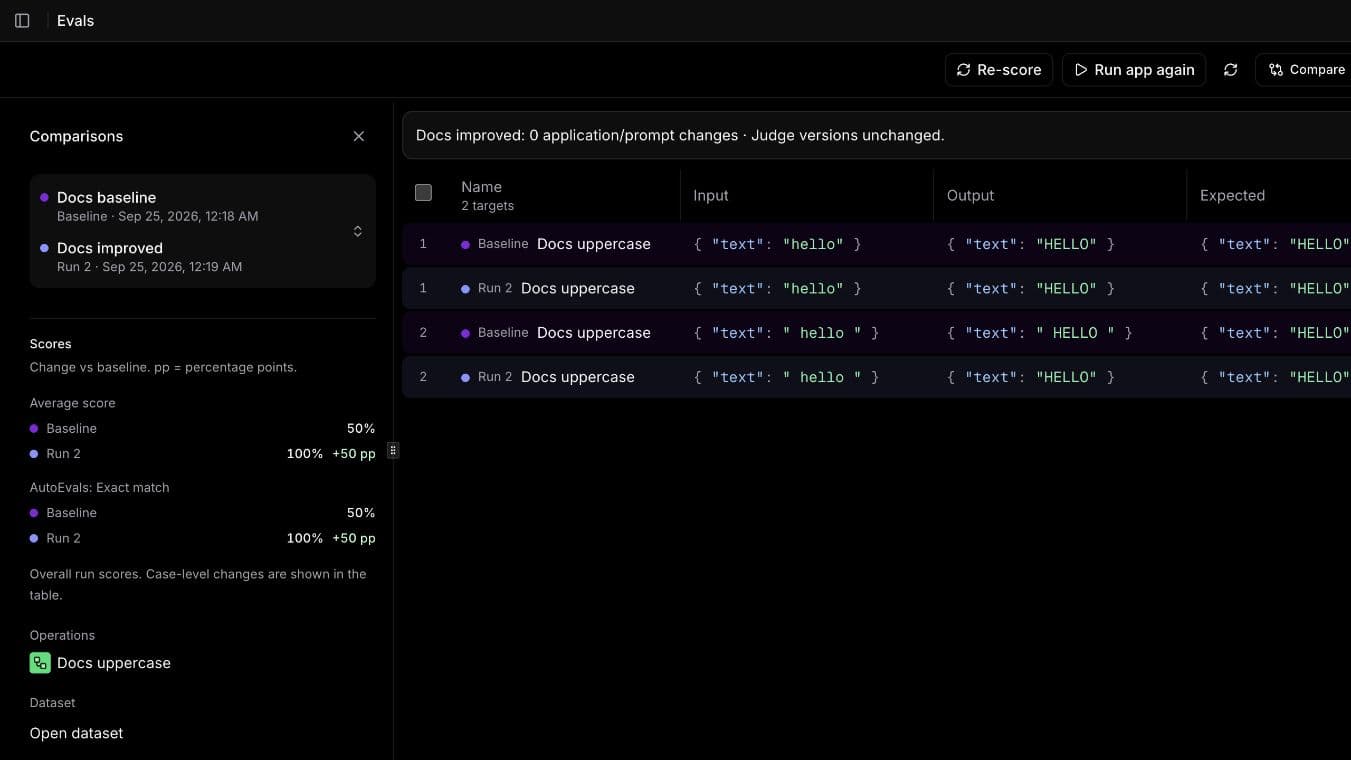
The comparison pairs the same inputs across both runs. Inspect the second case's output as well as the aggregate improvement. The application/prompt change count tracks recorded configuration; it does not detect edits to your local handler, so retain your application commit alongside the run.
Re-score saved traces is useful when changing a judge. It cannot test this app fix because it reuses the baseline's already recorded outputs.
Copy the improved run's ID from its URL or CLI output, then run:
npx datool evals gate YOUR_IMPROVED_RUN_ID --min-score 1 --min-pass-rate 1
npx datool evals export YOUR_IMPROVED_RUN_ID --out uppercase-results.ndjson
The gate should exit 0. Gating the baseline with the same thresholds should exit 2. A completed run alone is not a passing gate. See CI evaluation gates for an automated run, explicit failure handling, and version controls.
| Symptom | Check |
|---|---|
| App unavailable | Keep connect running and check that it selected the same host and project. |
| Dataset import is forbidden | Imports currently require both datasets:write and scorers:write. |
| Both baseline cases pass | Confirm the first handler has no trim() and the second case still includes spaces. |
| The fixed run still fails | Restart the connection and choose Run app again, rather than re-scoring old outputs. |
| Score is null | Open the execution error; check scorer mappings and runtime readiness. |
You can now substitute your application's handler and real cases, use a managed prompt, or capture cases from production traces.